Cargo BI · Software redesign · Internship
Designing E-Learning and DNA for freight forwarders
During a 10-week UX/UI internship at Jonson Consult in autumn 2023, I helped redesign Cargo BI, software that sits on top of CargoWise One. I designed the E-Learning and DNA modules, and followed and updated the Figma design system the whole software was built from. The redesign became the live demo for customers and investors, and my Locofy handoff became the team’s standard.
Role
UX designer (intern)
School
Erhvervsakademi Aarhus — 3rd semester internship
Timeline
August – October 2023 (10 weeks)
Team
Cross-functional agile team

The 30-second version
At a glance
The whole project in four cards, for when you only have a minute.
Problem
Cargo BI sits on top of CargoWise, a powerful but data-heavy system. Know-how lived in people’s heads, every forwarder handled shipments their own way, and Jonson Consult needed a clear product to demo to customers and investors.
Solution
An admin panel where managers define one way of working in DNA and enroll their team in E-Learning courses. A chatbot the company bought in helps forwarders find a shipment or the right data and lesson when they’re stuck.
What I did
I redesigned E-Learning and DNA, turning complex data into clear, user-friendly screens. I followed and updated the design system, presented my designs at sprint reviews and handed them to developers.
Team
A cross-functional agile team of UX designers, front-end developers and logistics consultants. We worked in two-week sprints, and I built in feedback from stakeholders and the UX team.
01 — The problem
Why forwarders needed more than CargoWise
Jonson Consult is a 12-person start-up founded by three former freight forwarders. Their software, Cargo BI, connects to CargoWise One through its API, one of the most used systems in freight and logistics. CargoWise is powerful but built for fast data entry: long forms and grey grids, know-how that lives in people’s heads, and new staff who learn by asking colleagues.
Design brief
How can Cargo BI help forwarders learn and follow one agreed way of working, while being ready to demo to customers and investors?
How we defined success
Before designing the screens, we agreed on what the redesign had to do. These three goals guided the work.
Goal 1
Learn in the flow
Teach each step of a shipment process with short lessons, right where people work.
Goal 2
One way of working
Let a company define its processes once, so every forwarder follows the same steps.
Goal 3
Consistent and demo-ready
Build every screen from one design system, so the software looks finished and stays consistent.
02 — How we worked
Sprints, reviews and a shared design system
The demo had priority, so there was no time for user research. We worked in two-week sprints in Azure DevOps. I planned my screens in a Gantt chart, estimated each task in sprint points and presented my designs at the sprint review every other week.
My internship in numbers
Weeks
10
as UX/UI designer in the design team, August to October 2023.
Sprints
2 weeks
per sprint, planned in Azure DevOps and reviewed with my supervisor.
Screens
8
E-Learning and DNA screens in my own sprint plan, plus their HTML/CSS handoff.
What the software had to solve
E-Learning
New staff learn processes by asking colleagues, and fixes are hard to explain.
DNA
There are hundreds of ways to handle a transport, so every forwarder did it differently.
Consistency
Many screens, several designers and a tight deadline made it easy for the design to drift.
I asked to test the flows with forwarders before they went to development, but the company chose to get the demo out as fast as possible. The design system and clear sprint reviews became our way to keep the quality up.

My Gantt chart for one sprint: the E-Learning screens, then the HTML/CSS handoff for CBT and DNA

The colour styles I worked with and kept updated: Primary #12436C, Primary variant #23659D, Secondary #0E3658 and Button #29ABF4
03 — Design
Key design decisions
I designed the screens in Figma, built from the shared design system with auto layout and colour styles, and presented them to the team at each sprint review.
How we got there

1. Colour styles

2. Components built with auto layout

3. Screens in light and dark mode
Decision 01
E-Learning built around the admin
Because
Admins need to make sure every new colleague learns the same process.
We decided
Give admins Enroll Users and Edit Course, so they can assign a course or learning path and keep lessons up to date.
Built with
Table, checkbox, status badge and button components from the design system.


Decision 02
DNA: one agreed way of working
Because
There can be hundreds of ways to handle a sea export, and each forwarder did it their own way.
We decided
Let managers define each process once, step by step, with rules and linked courses, so every forwarder follows the same steps.
Built with
Step cards, status badges and the sidebar pattern from the design system.
Decision 03
Learn without leaving the task
Because
Forwarders juggle many shipments at once and learn best on the job.
We decided
A media player with short lessons, a lesson list with progress and “Mark as complete”, opened straight from My Courses.
Built with
Video player, progress and list components, all in the shared colour styles.

04 — Handoff
From Figma to code
Handing off with Figma alone cost the developers a lot of time. I found a Figma plugin, Locofy, that turns designs into HTML/CSS. For each task I uploaded both the Figma file and the HTML/CSS to Azure DevOps, so developers could see exactly how the design should look. Before handoff I checked the code and left notes wherever the plugin got something wrong.
Two views
Learner and admin
The same course, seen by the learner and by the admin who manages it.
Learner
My Courses

Continue where you left off, with progress on every course and learning path.
Admin
Edit Course

Edit lessons, link them to a DNA process, and get flagged when that process changes.
What worked
Faster handoff
Developers started from ready HTML/CSS instead of rebuilding each screen from Figma, which saved them a lot of time.
What worked
Shared language
My HTML/CSS background from multimedia design let me talk to developers in their terms.
What worked
Adopted by the company
Jonson Consult made Locofy part of how the next intern works.
What I’d change
The demo went out without being tested with real forwarders. I’d run a few short usability tests on the E-Learning and DNA flows before development, and map the stakeholders first, so design discussions are about users rather than opinions.
05 — Outcome
Ready for customer demos
The redesign became the live demo for future customers and investors, and helped the team find errors and gaps in the software.
Goal 1 · Learn in the flow
✓ Designed
My Courses, Media Player, Enroll Users and Edit Course.
Goal 2 · One way of working
✓ Designed
DNA processes with steps, rules and linked courses.
Goal 3 · Consistent
✓ Met
Every screen built from the shared design system, kept up to date.
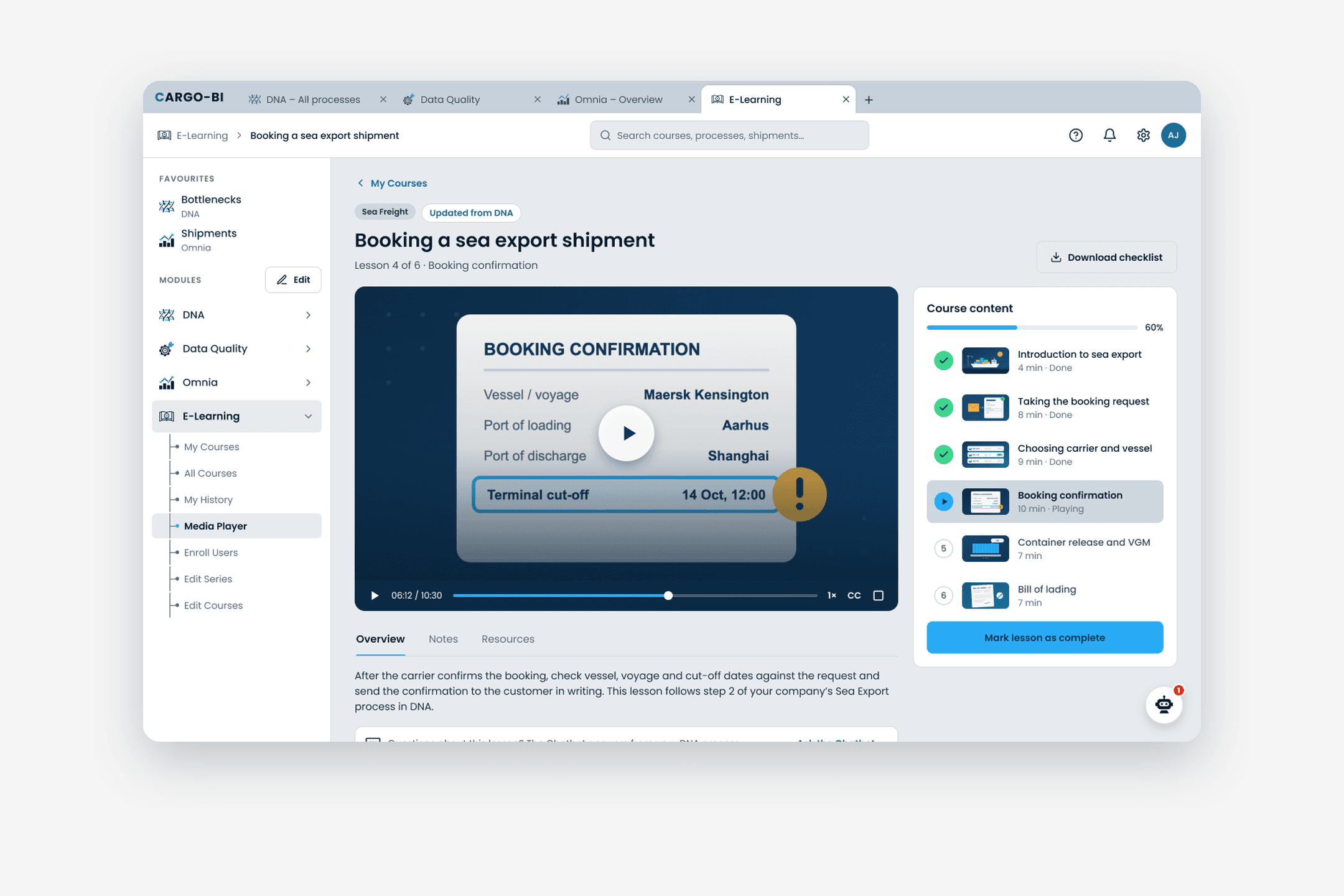
Because the software is complex, I brought my Figma file into Claude and built the prototype there, so it feels more like the real software than clicking through Figma frames. Click the image to open it in a new tab: log in, open a DNA process, enroll colleagues and watch a lesson.
06 — Reflection
What I’d take with me
Three things I’ll bring into my next project.
What I learned
Working in sprints with developers, and presenting my design choices clearly at sprint reviews.
What I’d do differently
Push for even a few usability tests before a demo goes out to customers.
What I’m proud of
Introducing Locofy, which the company kept using after my internship.
